Run Your Whole Agency in One Place
KIA OS keeps your establishments, your mashgichim, your coordinators and your records in one system. $9 per establishment each month.

What KIA OS Gives Your Agency
The management system runs your agency. The public website shows the public what your agency certifies, straight from the same records.
The pictures show the demo agency, Vaad HaKashrus of Maple Glen, a sample agency with sample data.
Part 1 · Private, for your office and mashgichim
The Management System
Mashgichim use it on a phone. Your office uses it on a computer.
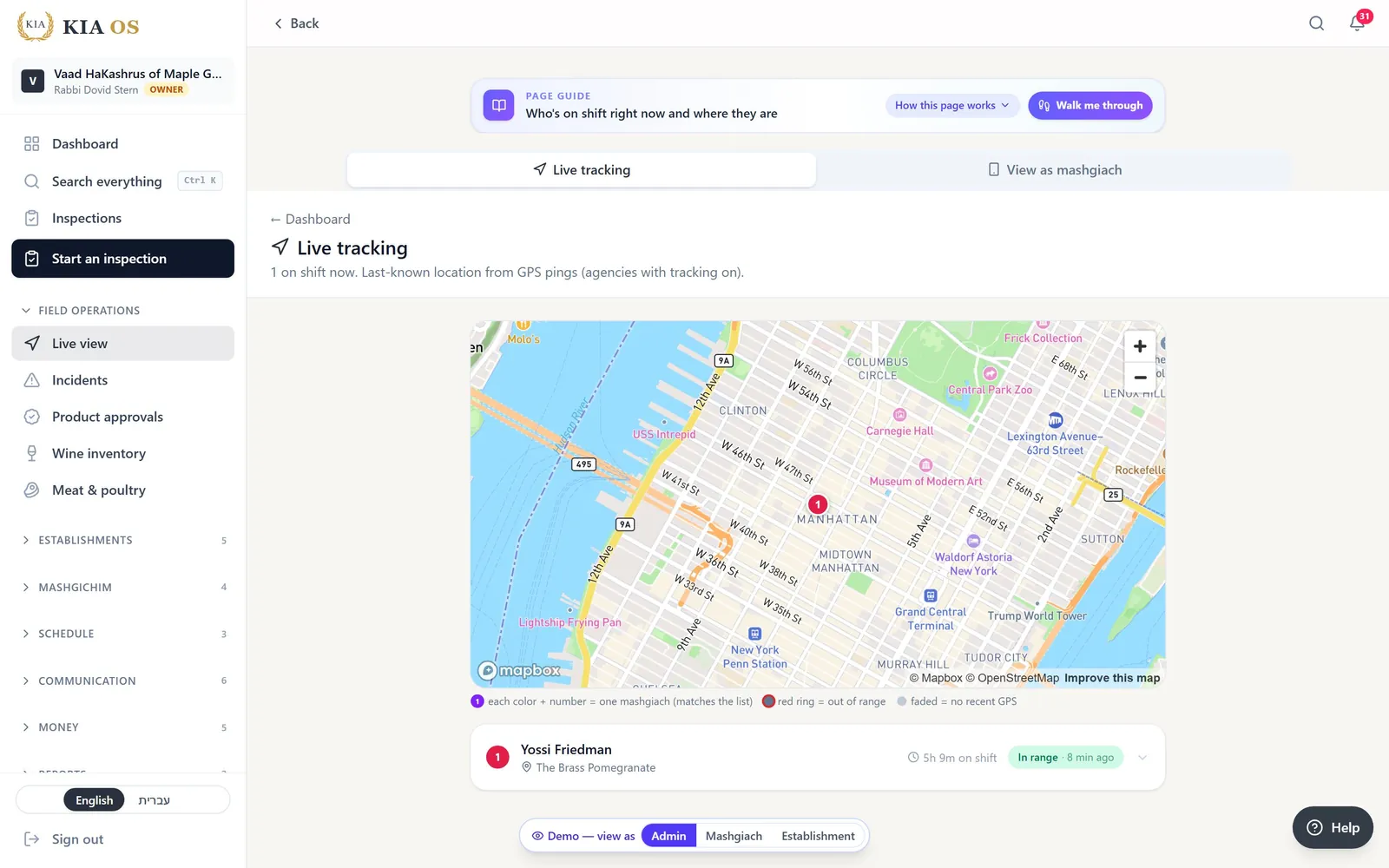
- Shifts, checklists, deliveries, wine and incidents, logged from the phone
- The office sees it live: who is working where, and what is waiting on you
- Receipts and hechsher symbols read in, and the reports written up
Part 2 · Public, for consumers and establishments
Your Agency’s Public Website
Built from the records in KIA OS. Your office edits the rest.
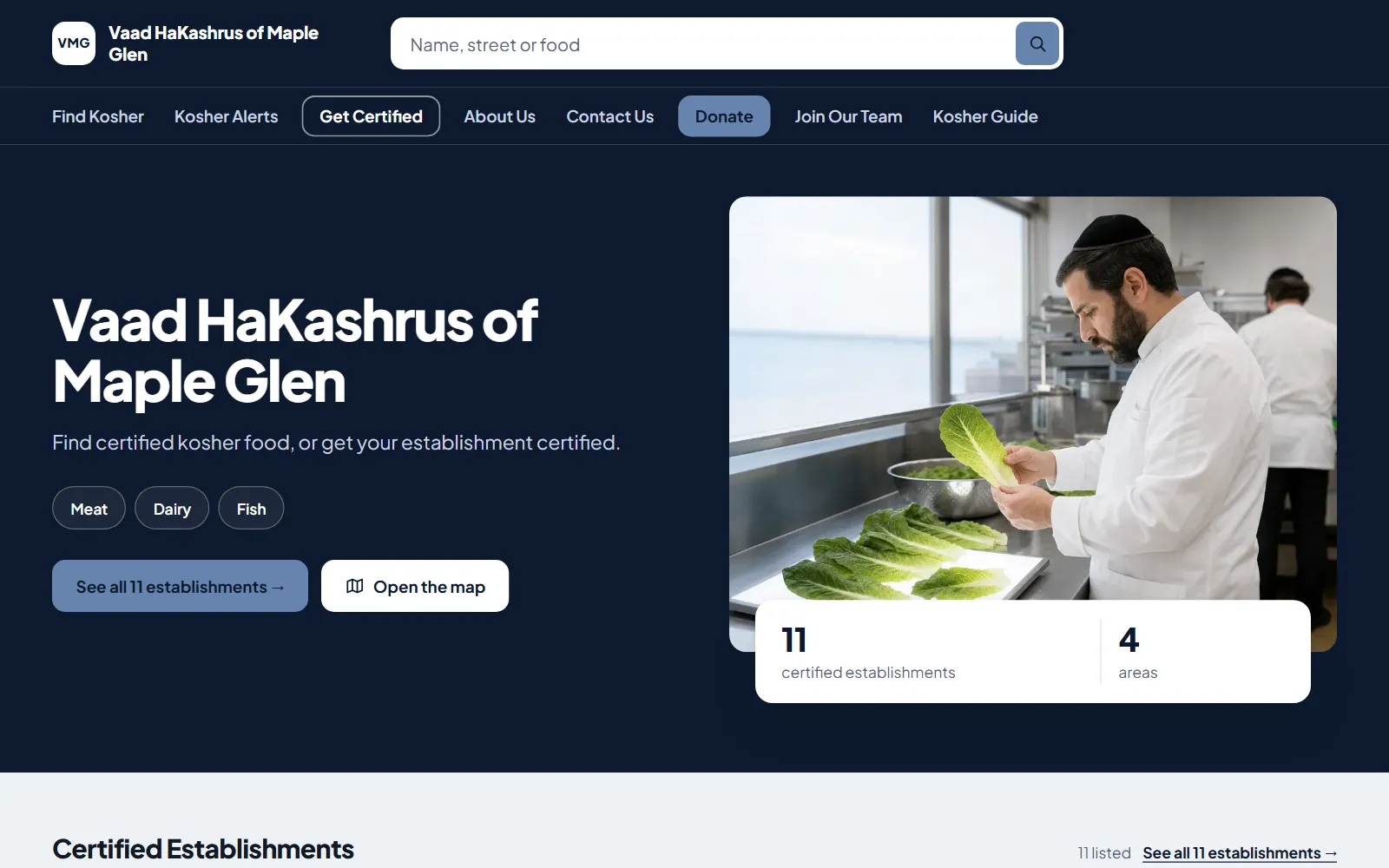
- Find Kosher, with a map and the date each certificate runs through
- A live certificate page for every establishment, opened by its QR code
- Kosher Alerts by email, and Get Certified straight into onboarding
Part 1 · The management system
How a Shift Runs
A mashgiach records what he does at the establishment, and a coordinator sees it in the same system.
On the Phone
The mashgiach clocks in with a GPS stamp and works through the checklist his agency wrote for that kind of kitchen. He logs deliveries against their hechsherim, counts non-mevushal wine bottle by bottle, records catering events, and reports a problem the moment he finds one. Every item saves as he goes.
On the Desktop
The coordinator sees who is working where on one map, what has been checked today, which products are waiting on a decision and which incidents have come in.
What It Handles
Establishments, with their status, their supervision level and their history in one record.
Mashgichim, with their assignments, their agency-held certification record and their contact details.
Coordinators, with their own logins and their own view of the establishments they cover.
Records, kept as you go and already written when somebody asks for them.

What Else It Does
Product Approvals
A mashgiach submits a product from the field. Your agency approves it for one establishment or across the board, and the record keeps who decided and when.
Incidents and Alerts
A problem alerts you in KIA OS and by email the moment it is logged, while the mashgiach carries on with the rest of his shift.
Checklists You Write
Your agency writes its own checklists for meat, dairy, bakery, sushi and market floors, choosing from a database of questions.
English and Hebrew
Every screen works in either language, for every role, and you can switch whenever you like.
Who Can See Your Data
Each agency is separated at the database level. One agency can never see another agency’s establishments, people or records.
Reading and Filing the Paperwork
KIA OS reads the paperwork, writes it up and files it. Your people make every decision.
- Photograph a delivery receipt and the supplier, the invoice number, the total and every line item fill themselves in.
- Point the camera at a hechsher and it is read against a registry of verified marks, then checked against the list your agency accepts.
- Speak a voice note in any language and a written incident report reaches the coordinator.
- End-of-day summaries roll up every shift, and a compliance pack is one click.

An App, Without an App Store
KIA OS installs to any phone straight from a link. It does not go through an app store, there is no file to download, and nobody has to approve it first. A coordinator standing in a kitchen taps Install once and it sits on their home screen like anything else.

Part 2 · The public website
Your Agency’s Public Website
KIA OS builds a public website for your agency from the records you already keep in it. The establishments, certificates and alerts on the site come from KIA OS, so nobody types them twice. The website is an add-on, and its plans are listed beside KIA OS’s price further down.
Every picture in this part is the demo agency, Vaad HaKashrus of Maple Glen, a sample agency with sample establishments.

Find Kosher
Every establishment your agency certifies and chooses to list, with its kind, its category and the date its certificate runs through. Visitors filter by meat, dairy, fish, area or what is open now, or look on the map.
See this page on the sample website
A Live Certificate Page
Each establishment has its own page showing the certificate your agency issued: the same signed Letter of Certification that KIA OS prints, in your agency’s own style, with its number and the date it runs through. The QR code on the printed certificate opens this page, so anyone holding the paper can check that it is still current.
See this page on the sample website
Kosher Alerts
Your office publishes Kosher Alerts on the site, and anyone can sign up to get them by email. When KIA OS records a newly certified establishment, the site announces it without anyone typing it in.
See this page on the sample website
Get Certified
An establishment that wants your supervision applies on your website, on your own KIA OS application form. The application arrives in KIA OS, where your office takes it through onboarding.
See this page on the sample website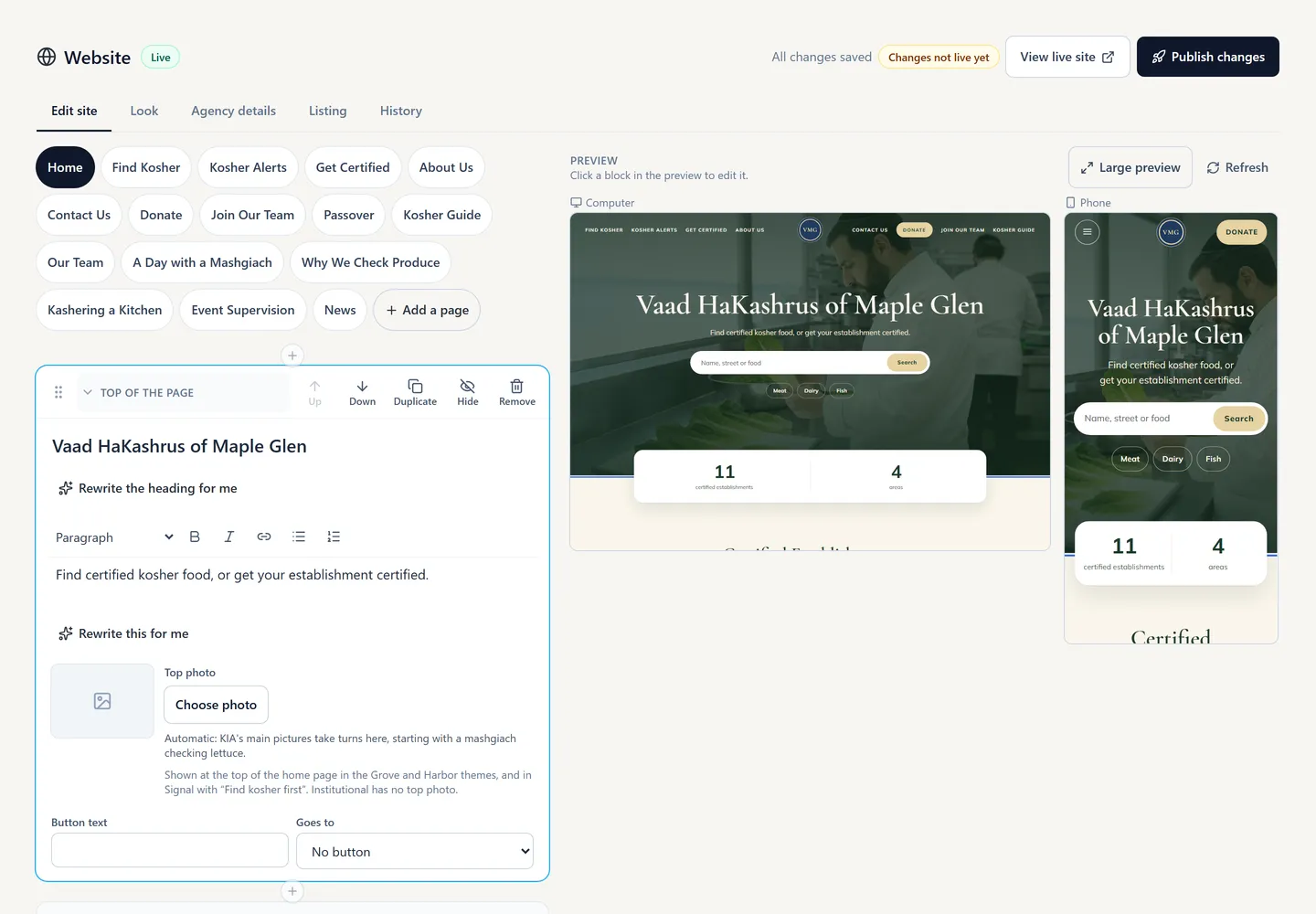
The Editor, Inside KIA OS
Your office edits everything else in KIA OS. Pages are built from blocks, a block is edited by clicking it in the preview, and changes wait in a draft until someone presses Publish. The steps to try it are below.
Keeping the Website Current
Most of the upkeep happens on its own, from the records in KIA OS. Your office edits everything else in a block editor.
What Happens on Its Own
- When a certificate ends, the establishment’s page shows renewal in progress for 14 days. After that the establishment comes off the site until your agency certifies it again.
- Each month your office gets a site-check email when something needs attention: certificates of listed establishments ending in the next 30 days, alerts nearing a year old, and published pages nobody has changed in a year.
- A seasonal page, such as Passover, shows during its dates and hides itself when they end.
What Your Office Edits
- Pages are built from blocks: text, headings, quotes, buttons, photos, galleries, video, logos, lines and spaces, cards, steps, questions and answers, your rabbonim and staff, office contact details, and your KIA OS forms.
- Click a block in the preview to edit it, drag blocks into a new order, and bring back a removed block with Undo.
- Changes wait in a draft until someone presses Publish. Every published version is kept and can be restored.
- From a phone, your office can post a Kosher Alert, change text or the logo, and publish.
- “Rewrite this for me” suggests clearer wording for a heading or a paragraph, and you choose whether to use it.
Look and Address
- If a brand color would make text hard to read, the site adjusts it until the text meets WCAG AA contrast, or keeps the look’s own color when no adjustment works.
- Photos come from a built-in library, matched to each establishment’s kind. Your office can choose another or upload its own.
- Each site has its own KIA web address. Connecting your agency’s own domain is not available yet.
What It Costs
KIA OS
$9 per establishment, per month. Unlimited coordinators and unlimited mashgichim, because charging an agency for adding the people who do the work is a strange way to price software.
That is the whole price list for KIA OS.
Your Agency’s Public Website
The website is optional and comes on top of KIA OS. Each plan’s price covers your first 11 establishments and adds a set amount a month for each one after, counted the way KIA OS counts them.
Essential
$49 a month
Then $1 a month for each establishment after 11
- Find Kosher with a map, a live certificate page for every establishment, Kosher Alerts and Get Certified
- Four looks, with your logo and brand color
- Draft and Publish, with every published version kept
- Up to 5 pages of your own
- 2 editors
- Help by email within 2 business days
Professional
$99 a month
Then $2 a month for each establishment after 11
- Everything in Essential
- Kosher Alerts by email, and a monthly digest
- Newly certified establishments and certificate changes, posted on the site automatically
- A Passover page and a kosher guide
- “Rewrite this for me” and quick edits from a phone
- As many pages of your own as you need
- 5 editors
- Help within 1 business day
Premium
$199 a month
Then $3 a month for each establishment after 11
- Everything in Professional
- Regions on Find Kosher, and your own fonts
- No KIA credit at the foot of the site
- Two tasks a month done by KIA: a small change, moving a page, or a new page
- Unlimited editors
- Same-day help by phone
Plans are billed monthly. Above 100 establishments, we agree the price with you. Some of what this page describes comes with Professional or Premium, as listed here.
Reach out to set up your website. Website plans are set up with each agency directly, not online.
Talk to usTry the Website Yourself
The Public Site, in Any of the Four Looks
The sample agency, in each of the four looks. Your agency picks one and adds its own logo and brand color, and your site shows your own establishments.
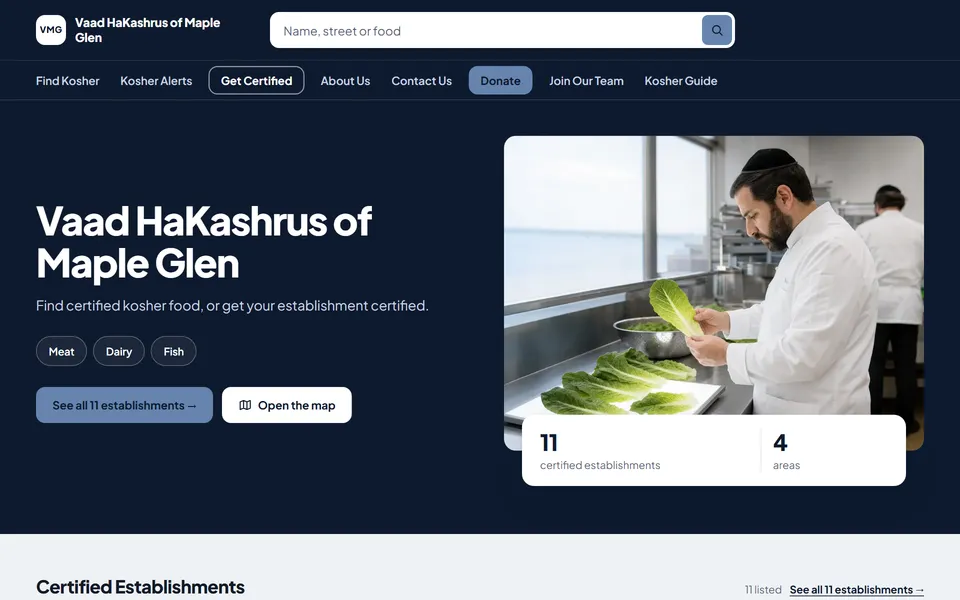 SignalModern, with search in the header and Call and Directions buttons
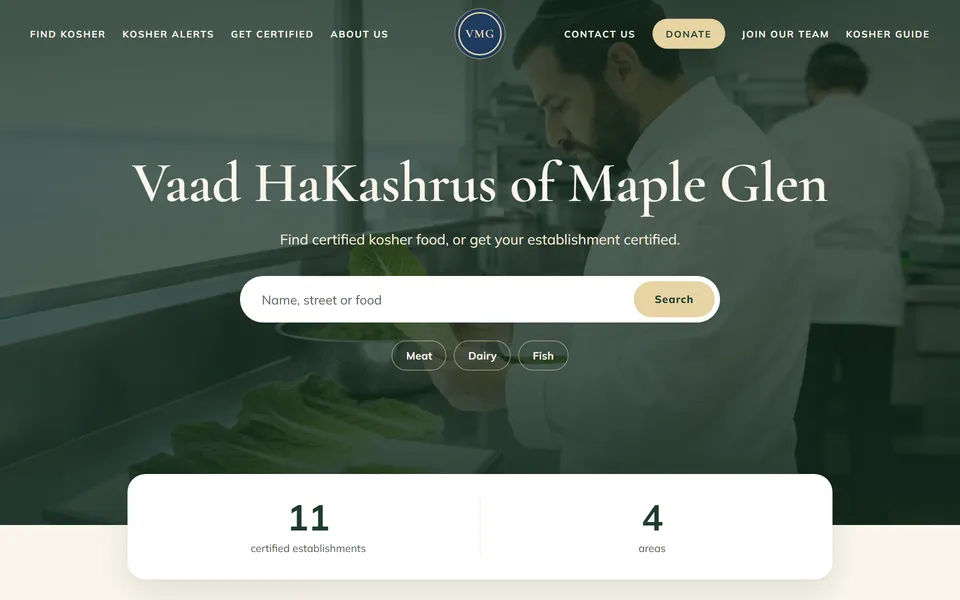 GroveDeep green and brass, with large rounded photographs
 HarborLight and welcoming, with sand and sky colors and airy white cards
 InstitutionalOfficial and full of information, with tabs and a compact table
The Editor, in the KIA OS Demo
- Ask for the website builder demo on a short form and agree to the terms. Once KIA approves it, the link arrives by email.
- The link opens the website builder on your own private copy of the sample agency’s website.
- Edit a page, change the look and press Publish. Your changes go to your own private copy, and the public sample stays as it is.
Who Is Using It Now
One of the largest foodservice organizations in the world runs its entire operation on it; further agencies are committed and onboarding.
What KIA OS Does Not Do
It does not certify anyone. Your agency’s approvals are made by your people and recorded in your system. KIA has no view into your religious decisions and takes no position on them.
It is also separate from the AKO mashgiach card database. Cards, expirations and renewals live there, and that stays the case.